Home · Guides / 2
Guide 2 of 5
How to create a .onion address
v2 names were 16 characters. v3 names are 56 characters. A generator can give you a more readable prefix; it is optional. Tor already creates a usable hostname when you enable the hidden service.
| Version | Example |
|---|---|
| v2 (retired) | yyhws9optuwiwsns.onion |
| v3 | hello23twa7k536qggxfeqm4orwohwlca3ln6f43b4splcym57msaxid.onion |
Specification background: v3 onion services replaced the older v2 design.
/var/lib/tor/hidden_service/hostname if you do not need a custom prefix.
Linux VM for mkp224o
mkp224o builds vanity ed25519 onion addresses. At the time these notes were written, that workflow was Linux-only.
-
Install Hyper-V on Windows 10 (free).
-
Download an Ubuntu desktop ISO. The original guide used 19.10; use a current LTS ISO instead.
-
Install Ubuntu in Hyper-V.
Build mkp224o
-
Download mkp224o from GitHub.
-
Extract the archive in Ubuntu (GUI or terminal).
unzip mkp224o-master.zip -
Generate the configure script.
./autogen.sh -
Configure before compiling.
./configure --enable-amd64-51-30k --enable-intfilter --enable-binsearch --enable-besort -
Build the binary.
make
Generate addresses
A useful prefix can take hours or weeks. Each match is stored as a folder named after the .onion address, with the public and private keys inside. The keys are binary; do not expect to open them in a text editor.
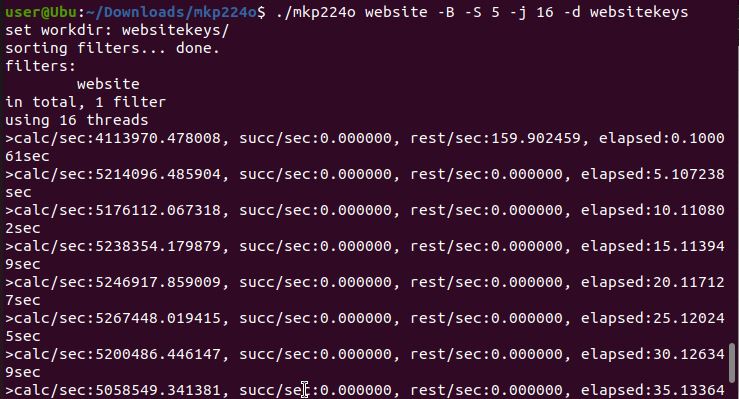
./mkp224o <beginning text> -B -S 5 -j 16 -d keys-BBatch: generate many candidates-SPrint statistics every N seconds (here, 5)-jCPU threads-dDirectory for generated keys
Example:
./mkp224o website -B -S 5 -j 16 -d websitekeys